Showing posts with label Android. Show all posts

ZTe Blade ( New Website )

ZTeBlade

This is new website for users or not ZTe Blade , We present a news for Android software, tricks and more .

Don’t forget if you like us please make a like on our Facebook here

Don’t Forget translate our Webpage ( Portuguese )  to your language

If you have a especial software send to us , and we share Sorriso

Google Chrome to Phone Extension

With this extension, a button is added to Google Chrome that lets you send direct push on links, maps, text and phone numbers that are selected for your Android device. You can also right-click on a link or selection in a web page and send it to your Android device.
You also need to install Chrome to Phone application on your Android phone. You can download the application on the Android Market (search for "Chrome to Phone"). You need a cell phone with Android 2.2 ("Froyo") or later.


Top 10 Reasons To Root Your Android Phone

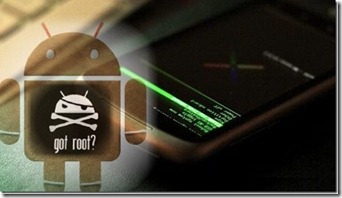
dffdd111_thumbPeople say there are always two classes of technology users; those who take and use technology the way it is brought to them, no questions or complaints, while others who want to indulge deep into the very essence of what’s being offered, and want to empower themselves with everything to take the maximum out of that technology. This rule of thumb holds true for mobile phones as well. The power user crowd has always been different from the average.

If you want to skip the details and get straight to the rooting process, feel free to head over to our guide on how to root your Android phone or tablet device.

Back from the old Windows Mobile ROM cooking days, people have been questioning limitations of every device and finding workarounds. When iPhone was launched back in 2007, the power user (a.k.a hackers and geeks) side of the users quickly realized the true potential the device held, and the cruel software limitations that Apple had sealed it with. What became ‘Jailbreaking’ on iPhone was quickly translated to other platforms as well, and when the world saw the first Android back in 2008, the same concept got adapted there too.

phone status

Android, despite being open source, still did not give a user complete control over the device. This laid basis for many potential abilities remaining dormant, and subsequently Android devices began to get ‘rooted’. Now this begets the question, why root? With so many Android-based handsets out there now, this question has become even more important.

Rooting essentially means gaining root-level access to your device. Those who have used Linux OS will easily understand, but for users like me who have been loyal to Microsoft’s operating system all their lives, this means that by rooting your device you get complete control over what should remain in the device and what not. Rooting means you are the master and in control, not to mention the fun of it.

Hence, here’s a list of my top 10 reasons (in no particular order) that I consider worthy of rooting your device for.

Performance Update

There are just too many flavors of Android in the market, with every OEM or carrier adding their own personalization and customization to devices. While they may appeal to some, they do not let the device take full advantage of what the hardware is capable of. With root access, you can actually tweak the OS to behave entirely differently, and with infamous developers like Cyanogen working on custom ROMs and mods, people have actually reported performance boosts. Take the G1 for example. The device never got 2.1 officially, but thanks to Cyanogonmod G1 owners can not only the tastiness of Eclair but also report much better performance than the stock ROMs.

Hardware/Software Interaction

Most Android devices come with hardware that is fairly heavily capable, yet the OS limits them and becomes the bottleneck. By rooting, you actually remove the bottleneck and hence can take full advantage of your beloved Android. For example, overclocking a device’s CPU is fairly simple and rather safe thanks to many third-party apps, yet the OS does not allow it natively, and hence overclocking can only be done with a rooted phone. Or suppose you want to use your mobile’s LED as flashlight (HTC Desire, anyone?) but cannot because HTC won’t allow it? Rooting will allow you to bypass this limitation!

APPS2Sd

One of the most talked-about feature (or disadvantage) of any Android device is the limitation where you can install applications only in the phone’s internal memory and not the SD card. While Google may reason that SD cards are slower in general and cannot run apps as effectively as internal memory, fact of the matter is that most Android devices do not come with massive internal storage spaces, and hence greatly limit the number of applications that can be installed at a time. With rooted devices, you can use Apps2SD, which will copy ALL your applications to a ext2/3/4 formatted SD card an will also store future builds in card. Freedom to choose!

Unavailable Features

When Google brought forth the Nexus One, one of the aesthetically pleasing features was Live Wallpapers. Unfortunately, most of the Android phones vary so greatly, that despite the hardware being compatible with Live Wallpapers, the software won’t allow them to run. My Samsung Galaxy Spica is a perfect example. The handset’s hardware can easily handle Live Wallpapers, yet Samsung chose to exclude it. Thanks to rooting, you can have them on your device as long as hardware allows.

EXTRA APPLICATIONS

Folks at XDA-Developers have created a wonderful application, SetCPU, which allows easy overclocking of various Android CPUs. However, due to the permissions required for such level of operation, a superuser access is necessary, and that can come only from a root access. This is just one example. The internet is flooded with many such applications that remain useless unless you have rooted your phone.

Multitouch

If you have ever typed on an iPhone, you would always remember the smooth, fast typing action that you achieve on that amazing keyboard. Or if you can recall that pinch-zoom actions. These are the products of a multitouch screen.

While most Androids can deal with multitouch, various manufacturers have decided to omit it in their devices. This is not always because the hardware is incapable, but because the software does not let it happen. This becomes even more irritating when you see that HTC Hero had multitouch input support back from the Android 1.6 days, but more modern more powerful 2.1 devices never got it (again, my Spica).

Thanks to rooting, it has become possible to get multitouch input in various devices, most notably the G1.

WIFI AND Bluetooth Tethering

After having rooted your device, you can also use WiFi or Bluetooth tether to share your cellular data connection with your laptop or PC. The application works with ad hoc connections and will get you up and running online on your laptop in no time. Similarly, tethering can also be achieved over a Bluetooth connection. You may check out the app in question here, but remember, rooted-phones only!

Better Keyboard

I have expressed before and I will say again; I do not dislike the Android keyboard. However, it just isn’t enough. HTC, with their SenseUI, brought to their devices the revered HTC IME keyboard which had predictive text input, and made typing a breeze. Since it was an HTC only keyboard, people with phones from other manufacturers were left blindfolded. Again, the root-developer community ported the keyboard for all platforms, making possible for all rooted phones to take advantage of the better input method.

APPS From Other Builds

Almost every build of Android OS differs from others when it comes to default apps. G1 hasn’t got the same stuff as myTouch 3G; Nexus One differs from HTC Desire. What’s more, these applications from one build cannot be ported to another. Hence you are stuck in more than one ways. However, with custom ROMs, the developers usually gather the best of the lot in one complete package, that would leave a user satisfied, not craving. And to get these custom ROMs running on your phone, you need root.

Because You Can!

I am serious, I consider this a reason. You have a powerful, capable device that you have paid for. You should have the right to modify or change it in any way you like. The device is your property, and you would naturally want to see it working at its maximum potential. Hence the point of rooting.

With the latest Froyo announcement at Google’s 2010 I/O conference, most of these reasons may become useless. But Froyo will not be pushed for all devices, at least not immediately. While it will aim to reduce the fragmentation in Android division, until it happens, a rooted device is the only option you have.

Last, please do remember that rooting voids your warranty. Although you can always go back to a stock version of the OS, it is risky business, hence proceed with caution.

Start rooting

Now that you have learned all about what rooting is and why you should root your phone, head over to our guide on how to root your Android phone or tablet device and start rooting!

Android App Turns Smartphones Into Mobile Hacking Machines

Dangerous hacks come in small packages.

zukantiOr they will, perhaps, when an app called Anti, or Android Network Toolkit, hits the Android market next week. The program, which Israeli security firm Zimperium revealed at the Defcon hacker conference in Las Vegas Friday and plans to make available to Android users in coming days, is designed for penetration testing–in theory, searching out and demonstrating vulnerabilities in computer systems so that they can be patched. Anti aims to bring all the hacking tools available to penetration testers on PCs to smartphones, with an automated interface intended to make sniffing local networks and owning remote servers as simple as pushing a few buttons.

“We wanted to create a penetration testing tool for the masses, says Itzhak “Zuk” Avraham, founder of Tel-Aviv-based Zimperium. “It’s about being able to do what advanced hackers do with a really good implementation. In your pocket.”

Anti, a free app with a $10 corporate upgrade, will offer a wi-fi-scanning tool for finding open networks and showing all potential target devices on those networks, as well as traceroute software that can reveal the IP addresses of faraway servers. When a target is identified, the app offers up a simple menu with commands like “Man-In-The-Middle” to eavesdrop on local devices, or even “Attack”; The app is designed to run exploits collected in platforms like Metasploit or ExploitDB, using vulnerabilities in out-of-date software to compromise targets.  

For now, the demonstration app Avraham showed me was equipped with only a few exploits: One aimed at a bug in Windows–the same flaw exploited by the Conficker worm in 2009–another targeting default SSH passwords in jailbroken iPhones, and a third exploiting a vulnerable, older version of Android. Zimperium has also built a Windows trojan that allows Anti to perform automated commands on hijacked machines like taking a screenshot, ejecting a CD, or opening the calculator, a common penetration-testing demonstration.

Even in its current form, the app raises the possibility of dangerous, stealthy attacks. A hacker could, for instance, walk into a coffee shop or a corporate office with his phone and start sussing out machines for data theft or malware infection. But Avraham says Zimperium will ask users in its terms of service to limit their hacking to “white hat” penetration testing.  

“Hacking is not for the chosen few,” reads one description in the app’s documentation, formatted in Star Wars-style scrolling text. “Anti is your perfect mobile companion, doing it all for you. Please remember, with great power comes great responsibility. Use it wisely.”

Penetration testers who saw the app at Defcon were impressed. “It’s just sick,” says Don Bailey, a researcher with security firm iSec Partners. “The way it populates the screen with vulnerable targets…it’s really elegant.”

Another professional penetration tester for a defense contractor firm who asked that his name not be used called the app a “quick and dirty Swiss army knife for mobile pen testing.” “It’s so polished it’s almost like playing a video game,” he says, comparing it to penetration testing suites that cost thousands of dollars.

With its sheer simplicity, Anti’s impact could be comparable to that of Firesheep, a proof-of-concept tool released in October of last year that allowed anyone to easily snoop on devices on unsecured wi-fi networks that connected to unencrypted web pages. That tool was downloaded more than 1.7 million times, and no doubt used in some instances to spy on web users unawares. But it also helped inspire both Twitter and Facebook to encrypt traffic to their site and prevent such eavesdropping.

“People might use it in dangerous ways,” Avraham says with a shrug. “I really hope not. But I know this might be the risk to help people increase their security, and that’s our goal.”

anticredit_00

anticredit_01

anticredit_02

Website : http://www.zimperium.com/Android_Network_Toolkit.html#anti-apk

Download : http://box2me.dyndns.org/Android/Applications/Anti1.0.apk

Download to mobile :

img

HTC unveils new "machine" entertainment

Has name and star of entertainment manufacturer presents it as a strong candidate to become one. To do so, invest in a generous 4.7-inch screen and an audio system created by professional musicians.
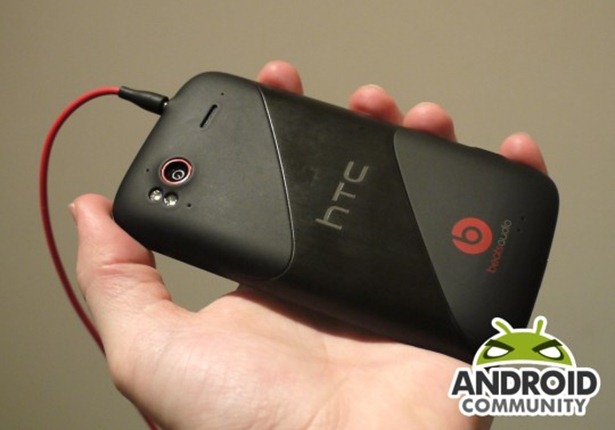
HTC Sensation XL is the second model that the manufacturer taking advantage of the technology boom Beats Audio, which has acquired with the purchase of Electronics Beats in August (for which it paid 300 million U.S. dollars) .
The company, founded by producer Jimmy Iovine and the rapper Dr. Dre has specialized in the development of a headset for "sound of high performance," he explained at the time. It is that sound high-performance claims that HTC now have integrated into theirsmartphones Sensation XE and XL

htc-sensation-xe_01

The first was presented in September and is now the turn of the Sensation XL debut, which has announced European arrival in stores in early November. In EMEA, the equipment will be sold in a limited package that also includes a special edition of Solo Beats headphones. Prices are not yet known.


htc-sensation-xe_02htc-sensation-xe-4

The goal is that Android is seen not just as a smartphone,but as a platform for listening to music, watch movies and play details the company in a press release.
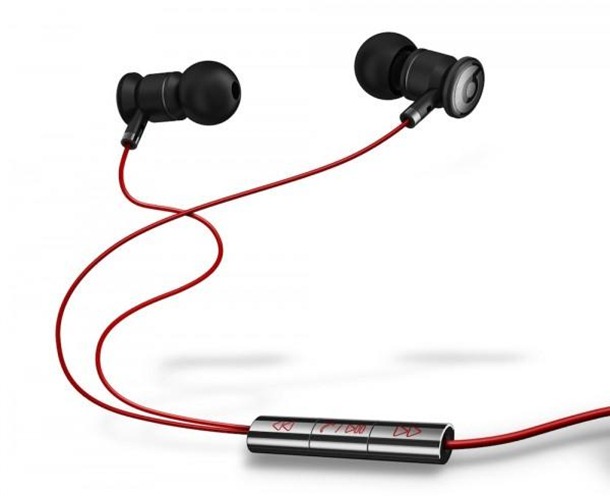
Provided with "urBeats lightweight headphones, designed exclusively for a new integrated technology Beats the equipment," also has a built-in microphone for calls in "hands-free" and a remote control - which allows you to pause, fast forward or go back to listen as well as answer a call in the middle of a song, describes the same source.
The 9.9 mm thick phone also offers support for an 8-megapixel camera and capture HD video (720p) with stereo sound, for example. The 1.5 GHz processor is another strong arguments in this "machine" that weighs 162.5 grams (with battery).

htc_sensation_xe_hands-on_ac_16-540x378

Speaking of battery, with autonomy to count up to about 7 hours (410 minutes) WCDMA talk time and 12 hours (710 minutes) in GSM. In standby, the device can handle up to 19 (WCDMA) or 15 days (GSM).

HTC-Sensation-XE-2

Meridian Media Player Autonomy

meridian-media-player-autonomy-01

The most functional and customizable player for your video and music in phone.

*You can't use widget if installed to SD!*

The Video/Music player with most customizable space.
Convenient gestures to control.
Advanced media folder settings, you can set including and excluding folders -- in ANY DEPTH. Not only one level under /sdcard now.
PlayQ rather than playlists, can handle videos, musics, and their MIXTURE. Also, you can put a folder, an artist, an album or like that into a PlayQ.


Other features:
- ID3 editing
- .srt subtitle support
- Song rating, can synchronize with PC in Pro version
- Play video as music, for your music videos
- Toolkit to rescan SD card, clean media database
- Folder browsing and index browsing
- Customizable tabs
...and more.

Application Information:

  • Price: Free
  • Requires: Android 1.5 and up
  • File size: 1.3M

QR Code to Download App:

img

Android too geek to pretty girls?!

The geek world is not sexist. We never crossed his mind to discriminate against the members of the opposite sex, because in these circles, the proportion of male members is much higher. And that is why we strongly condemns the statement too controversial of Mr. Frank Meehan, CEO of INQ. If you want to know more, follow the link and just as we feel offended! ;)

Natalie Thompson

So what Mr. Meehan said, a clear lack of tact towards (or rather AS) fans and Android smartphone users:
"If you go to a nightclub in any city in the world, the girl turns have an iPhone or a Blackberry. She does not have an Android. She has no emotional attachment to an Android phone. It is too complicated. It's a geek device, and all evil is done "

They may claim to want that Android is complicated, too fragmented, convoluted or something, but then to say that an Android phone is not for girls lovely!? DISAGREE. COMPLETELY.

We here at RD neutral despite our opinion these things mobile operating systems, we now say we are completely against this type of discrimination, and instead strongly support the efforts made by the brands to approach Android the terminals of the female audience. What else is not by chance that gives geeks could help turn a girl who is having difficulties with its new Android, is not it!? : P: D

Shame on you ... Mr. Meehan. shame on you.
SW, out! (I think ... are there to call someone who can not access the Market : D )

PC Monitor – Android

logosmallInnovative solution for monitoring and managing your computers using a securely encrypted mobile app that gives you total control of your PC's from anywhere.iPad (1)

iPhone (2)Quick Download


Website : http://mobilepcmonitor.com/

We Recommended this software Winking smile

The Story of the Android ...

Man dreams, the work was born and ... Google bought!

It was nearly 8 years it all started. In fact, there are only roughly two years is that its existence was noted, and since then, its growth has been abrupt.

The division of the company's Android developers [x] cubeLABS built an infographic, intuitive, full of interesting information that indicates all the points determining the life of this mobile OS. Take a look!

android


There are several controversies suggest that influences the direction that Google took this OS, especially from Apple. The appearance of the first iPhone, no physical keyboard, occurred before a prototype Android be known with the same look. Coincidence or not, there is no doubt that the path that took smartphones goes against the concept.

Consider the history of the Android ... until now. Note the vertical bar, far right, which will indicate the market share in a given period.

androidhistory_info1

The year 2010 was crucial in propelling the Android. The continuity of version 2.0 (Eclair) and the appearance of version 2.2 (Froyo) were crucial for the market share had that year, a growth of around 400%.

Not everything "roses" and, together with the success, come up dragging several problems both in terms of stability (Honeycomb recently in version 3.0) or the general level of fragmentation (due to the wide range of devices that hold this OS).

androidhistory_info2

The distribution of the versions shown above is not a surprise. The brands that did not distribute the obligation to maintain the support of the products they sell, in order to update them, so there are about 20% of users with versions lower than 2.2 (to May/2010) with serious problems of compatibility with several applications in the Market.

Hopefully the Google in the past month of May in the event Google I / O, announced the mandatory support of at least 18 months from the date of release of its terminal.

The next version 4.0 was announced and named Ice Cream Sandwich, is scheduled for later this year and promises to correct some blemishes on this OS. Be able to function and adapt to either the tablet orsmartphones (like the Apple iOS), thanks to a single framework, and promises not have the minimum hardwarerequirements so you can work properly on any device.

What do you think the future of Android? Will be able to dominate the mobile market?

Layar - See the World!


LAYAR

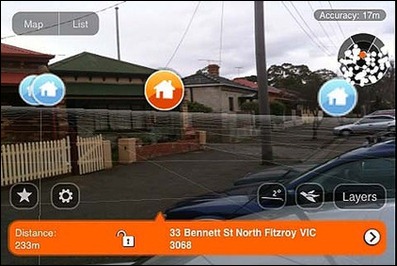
Layar is a mobile app for discovering information about the world around you. Using Augmented Reality (AR) technology, Layar displays digital information called “layers” into your smartphone’s field of vision.

Share your augmented experiences with your friends and followers on Facebook and Twitter. Connect your Layar account to any featured social network and share your favorite layers, spots and screenshots.

Find your way around in Augmented Reality with Layar's intuitive user interface. Start directly from your most favorable and recently used layers. Easily explore brand new and featured layers.

Last year we introduced 3D objects in augmented reality. Now, 3D objects are no longer just waiting to be discovered. They can come alive!

Choose from our catalog of over 2,000 layers and experience the world like never before!


Sapo Portugal ( Augmented Reality )


Download

10-22-08-android-bag

Battery Saving Tips for Longer Battery Life on Android Mobile Phone

android-battery-saving-tips

Android devices seriously lacks battery life. I personally own an android device and it gives a decent battery backup and many android phone owners feel their phone doesn’t give decent battery backup. Here are some few personal tips to keep your android phone battery backup for a longer time. Simple tweaks in your android phone can maximize Android battery life. Here are few which you need to take care of :


Turn off FM radio when not in use

Turn off 3G when you’re not using

If you’re at home use WiFi

Off GPS when you’re not using Maps

Vibration uses more battery, so turn off when you actually don’t require

Never use Third party task managers.

The default task killers in android is the best

Kill background running apps when you do not require actually

Juice defender app – best battery manager for android that improves battery life behind the scenes by intelligently managing the battery-draining components of your phone.

If you want to save few more hours of battery, then don’t use Live wallpapers on Android

Always Keep Short timeout for screen

Reduce brightness when you need some more battery hours ( I use this at emergency situation where I need to survive for few more hours with android )

Your flash LED uses battery more than any other process

Keeping your emails and other stuff such as contacts with gmail in auto sync will drain your battery soon

Trickle charging kernels for Rooted devices.

These are some tips which I felt which may increase the battery life of android devices. If you have some more tips, feel free to use the comment section.

Android secret codes

android

Android is now booming in the cell phone world. All major cell phone companies are launching android cellphones.If you are an android user, i have some secret codes of android which will help you. Some of the android secreat codes:


Cell Battery, WiFi Usage etc Info *#*#4636#*#*
Restore Factory Settings *#*#7780#*#*
Format Phone *2767*3855#
Launch service mode *#*#197328640#*#*
Test WiFi *#*#232339#*#* or *#*#526#*#* or *#*#528#*#*
Display WiFi MAC address *#*#232338#*#*
GPS test *#*#1472365#*#*
Other GPS test *#*#1575#*#*
Bluetooth test *#*#232331#*#*
Display Bluetooth physic address *#*#232337#*#
Start Gtalk monitoring *#*#8255#*#*
PDA, Phone, H/W, RFCallDate *#*#4986*2650468#*#*
PDA and Phone *#*#1234#*#*
FTA SW version *#*#1111#*#*

FTA HW version *#*#2222#*#*
PDA, Phone, csc, *#*#44336#*#*
Packet Loopback *#*#0283#*#*
LCD test *#*#0*#*#*
Melody test *#*#0673#*#* or *#*#0289#*#*
Device test such as vibration and lightness *#*#0842#*#*
Display touchscreen version *#*#2663#*#*
Touchscreen test *#*#2664#*#*
Distance sensor test *#*#0588#*#*
Display memory version *#*#3264#*#*

Auto WiFi Toggle – Android

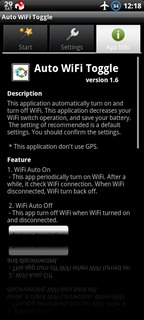
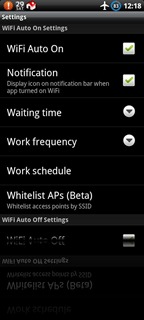
ss-480-5-10ss-480-0-11ss-480-2-10ss-480-1-10

This application will automatically turn on and turn off your phone WiFi. This application aims to decrease your WiFi operation, and therefore save your battery.
The recommended settings are selected by default. You should confirm the settings are appropriate for your usage of WiFi.

1. WiFi Auto On
- This app periodically turns on WiFi. After a while, it checks whether a WiFi connection has been made. When you do not have a WiFi connection, the phone WiFi is turned off.

2. WiFi Auto Off
- This app turns off WiFi when the phone WiFi service turned on but you are not connected to a known WiFi access point.
- Check Policy ("When screen on" or "Always")

* Please push the button("Start Application").
* This application doesn't use GPS.

Download

2x Battery – Android

ss-480-0-0ss-480-1-0ss-480-2-0

Are you running out of battery? This app extends many extra hours to your battery life by intelligently and transparently managing Mobile data connection.
You don't need to manually toggle Mobile data anymore. Using this app, it saves the power consumption and reduces your data plan expense by periodically toggling Mobile data in standby mode.
To prevent disrupting the active data transmission, this app monitors the data traffic and won't disable the connection until no more data is transmitted over the connection.
With this app, you can extends the battery life easily, and still keep the background data synchronization occur.
★ Manage data connection intelligently when device is in standby/sleep mode
★ Won't disable the data connection when background data sync or data transmission is active
★ Option to keep connection when charging
★ User settings always have priority
★ Home screen widgets
★ Support most phone types and carriers
To toggle the Mobile data connection by changing APN name may mess your APN settings. We use a different technology to manage your Mobile data. It's a better approach than APNdroid, BatteryFu, Green Power, APN OnOff, Quick Settings and other similar apps.
Android has already done a good job on managing WiFi connection when device is in sleep mode, so we only manage Mobile data for now. This app won't toggle wireless connection when WiFi connection is active.
Don't install this app on SD card. If you have task kill app installed, please add this app to task killer's ignore list.

Download

System info Widget – Android

d1d04ad1e2fphia.jpg System Info Widget v2.1

* 4G (EVO only)
* 3G/2G (Shortcut)
* Airplane mode, Auto sync
* Battery life/Status indicator
* Bluetooth & Wi-Fi On/Off
* Phone profiles
* Battery Temp. in °C and °F
* RAM, ROM & SD storage
* 4 widget sizes, 6 themes
* 15 widget items
* Custom update interval
* Custom font color

v2.1.3 (11/1/2010)
+ Status bar battery notification fix, fixed exception issues with custom ROM’s, removed debug output

Download

Android Market– Install apk without mobile ( Just on PC )

android-market

So you can install app “apk” without your mobile.

Just see this steps :

1º In mobile configure your account in market “gmail”

2º When finish turn off wifi on your mobile ( for test )

3º Now go to ( https://market.android.com/ ) , login with your account

4º Select one free app

5º Now Click “ Install “ , appears this :

android-market2

6º Select your mobile and now click “install” , now appears this message on this window : “ This application will be downloaded to your phone shortly. “

7º Now go to mobile and turn on Wifi , wait some seconds…

8º Now you have installed a favorite app

android


You have some tricks ? comment us

Translate Website

ShareThis